INSTALL AIRWAN
1/NETSCAPE BROWSER INSTALL
First, download and install Netscape Communicator 4.79 (or Navigator 4.78 for UNIX) like default browser
Be careful, when installing Netscape, you have to name the install directory : Navigator instead of Communicator
(you can't use Netscape 6 )
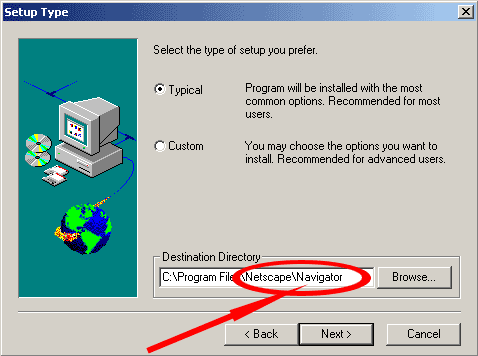
Netscape Communicator 4.79 for Microsoft Windows (95, 98, XP, NT, 2000)
Netscape Navigator 4.78 for UNIX (Irix)
2/VRML PLAYER INSTALL (for NETSCAPE)
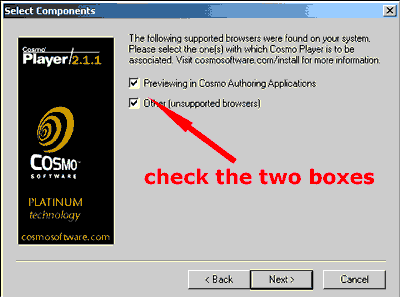
The second action is to download and install Cosmoplayer for visualize 3D VRML files
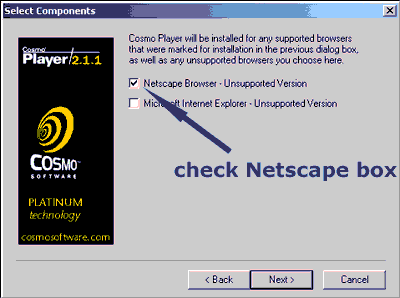
For this window, check only the Netscape Box
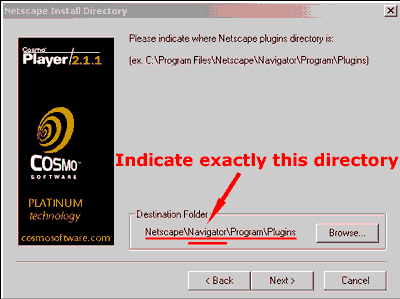
Indicate precisely the Cosmoplayer plugin's directory
Must be Navigator and not Communicator
3/VRML PLAYER FOR INTERNET EXPLORER
If you prefer use Internet Explorer, it's necessary to install Cortona VRML player
DOWNLOAD :
4/OPENING PORTS
if you cannot connect, please check these ports on your firewall:
81, 8202, 8203, 10002, 3611
5/CHECKING
If your installation is correct, you can visualize in 3D
this object in a new window when you click on it

If the VRML Player is visible, then click here to start Airwan application
( Download time with 56 Kbps modem is 3 mn)
For access to airwan's tutorial, click here
6/MINIMUM CONFIGURATION
Processor: Pentium III - 500 Mhz
Memory: 64 MB
Video: 3D graphics accelerator 16 MB